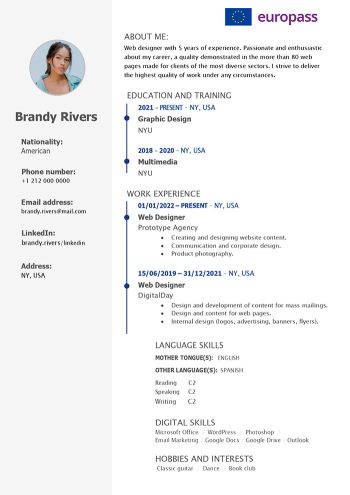
If you want to start a new life in Europe, my guess is that you also have to find a job. This Europass CV example in English will help you do just that. This CV is the most accepted template in all of the EU states.
Our template is free and easy to use! The Europass CV online editor is also free to use however it is very limiting. With our CV format that is customizable in Word, you can take that first step into your future with zero complications.
Important: This is not the official Europass CV. This template is inspired by the official Europass format but is not provided or endorsed by the European Union. To create an official Europass CV, visit europa.eu/europass.
What is the Europass CV format?
Defining the Europass CV
The Europass CV is ideal for anyone wishing to work in a European Union member country. It adheres to European standards. If you’re wondering, “how to create an European CV,” the Europass CV format will undoubtedly answer your question.
It aims to facilitate and standardize the job search for all European citizens, as well as for individuals outside the EU looking to find employment in Europe.
This European format will present your profile in a simple, effective, and organized manner. It allows any recruiter to have the necessary information to assess your profile. The European Curriculum Vitae adapts to all countries and all job applications.
Advantages
One of the main advantages of using a Europass CV is that because it is widely recognized across the EU, you will be doubling your chances of finding a job in your dream country. Below are other good reasons why you should download our free example now.
- Standardized format that will be readily accepted by employers.
- Easy-to-use template that provides guidance for creating an effective resume or CV.
- Presents work experience and qualifications in an organized manner that is likely to capture the attention of recruiters.
- Easily updated when needed.
- Showcases skills, educational background, and other relevant information.
- Promotes mobility across Europe.
- Professional design.
- Saves time compared to traditional resume creation.
Disadvantages
Although the European CV format provides a straightforward approach to creating resumes and CVs, it also has some disadvantages. For one, it’s more limiting than other resume templates, which can make it difficult to customize or tailor for certain job roles.
- Lack of flexibility for unique resumes or CVs as they are limited to a specific format.
- May not be suitable for all job seekers depending on their field.
- Unable to customize section headings.
How to create a Europass CV (Word & Online)
To create your Europass CV, you have two options:
Option 1: Use the Word template in Europass format available for free download.
On this page, we provide you with 2 editable templates available for free download. You can add missing categories, change the shape of the photo, choose the color you want…
Option 2: Create your CV online by creating your account on the Europass website.
The Europass CV has been revamped. Simple and modern, you can create it online directly on the official website of the European Union. Once you’ve completed your information, you can download your CV in PDF only.
Learn more about How to create a Europass CV
Customize your document without limits using our European Word CV Template. With this example, you can create a European CV online without creating an account (no login required).
How to edit our European CV Format in Word

Your European CV should include all the sections of a normal resume. The only difference is that the section headings must remain phrased in the way they are presented in our example. However, you can always download and personalize this CV template in Word by using your favorite colors and fonts to showcase your experience. We break down each section included on your resume below.
1. Download the free Europass CV template
Start by downloading the Word CV template by clicking on the download link at the top of this page. Once you’ve downloaded your Europass CV example, save it in the folder of your choice on your computer.
2. Choose the sections better corresponding to your country
In some countries, you don’t need to include a hobbies section, but you might need to add references instead. To show recruiters that you acknowledge their country’s best practices, it would be best to adapt your CV accordingly.
3. Fill in the different categories
Fill in the sections of the template. Its structure is similar to a traditional cv. The categories to fill in are personal information, work experience, training or education, skills, and languages.
As with a traditional CV, make sure you are concise and only include the information and experience you feel is relevant to the position you are applying for.
4. Reread your CV
One mistake you should avoid if you want to create a CV is forgetting to proofread it. Once you have filled in all the categories, look over your CV, and don’t hesitate to ask someone else to read it too!
5. Download your Europass CV as a PDF
Finally, download your finished CV in PDF format. All you have to do is go to “File” > “Save as” and then choose the PDF format before clicking on “Save.”
Once you’ve saved your CV as a PDF, you can go ahead and send it to recruiters in Europe!
Build your resume using the Europass CV online builder.
Europass CV Example (Text Format)
Below is a Europass CV example in text format to help you understand how to structure each section of your European CV before downloading the Word template.
John Doe
john.doe@email.com
(555) 555-5555
linkedin.com/johndoe
Profile Summary
Dynamic Marketing Director with over 10 years of international experience, adept at crafting and implementing innovative marketing strategies. Proven success in driving brand visibility, increasing market share, and fostering cross-functional collaboration. Skilled in leveraging data analytics to optimize campaigns and achieve measurable results.
Professional Experiences
Marketing Director, XYZ Tech Solutions
January 20XX – Present
- Led a global marketing team in executing a successful rebranding initiative, resulting in a 25% increase in brand recognition.
- Developed and implemented targeted digital marketing campaigns, contributing to a 30% growth in online sales.
- Established strategic partnerships with key industry influencers, expanding the company’s reach in new markets.
Senior Marketing Manager, ABC Consumer Electronics
June 20XX – December 20XX
- Spearheaded the launch of a product line in European markets, coordinating with local teams to adapt marketing strategies and achieve a 20% sales increase.
- Implemented a customer segmentation strategy, resulting in a 15% improvement in personalized marketing effectiveness.
- Conducted market research in Asia, identifying emerging trends and consumer preferences, leading to successful product localization.
Marketing Specialist, LMN Software Solutions
August 20XX – May 20XX
- Executed an integrated marketing campaign for a new software release, achieving a 40% increase in product awareness.
- Managed international trade show participation, establishing valuable partnerships and generating high-quality leads.
- Analyzed market trends in Latin America, contributing to the development of region-specific marketing strategies.
Education
BA Marketing, NYU
Graduated May 20XX
Software
- HubSpot
- Google Analytics
- Salesforce
- Adobe Creative Suite
- Hootsuite
- Asana
- Trello
Languages
- English (Native)
- Spanish (B2)
- French (B1)
Interests
- International Travel
- Photography
- Cultural Studies
- Sustainable Practices
- Outdoor Adventure
Europass CV FAQs
Is this Europass CV template free?
Yes. This Europass CV template is 100% free to download and use. No registration or account creation is required.
How to make a good Europass CV?
To make a good Europass CV format, make sure you:
- Fill in your CV information correctly in the corresponding sections.
- Write a profile summary that is clear and concise.
- Then, choose your headings according to the position and the country you are applying for. With our Word template, you can edit your CV as many times as you need.
- Finally, export your European CV in PDF format.
How to change the layout of a European CV?
To change the layout of your Europass CV, you can:
- Do it directly on the Europass website and choose one of the 4 templates. However, the possibilities are limited (colors, sections, photo format, etc.).
- Use our Word template and make all the modifications you want.
How to fill in and modify the Europass CV?
To fill in and modify your European CV, you have two options:
- Download our CV template for free with a single click. You can easily fill it in and make modifications on Word, saving your CV in any format (Word, PDF, etc.).
- Alternatively, you can use the Europass website, where you need to create an account and fill in the curriculum vitae through your browser. You can only export your CV in PDF format.
Should I put a photo on my European CV?
Yes. Adding a photo to your CV is common practice in Europe. Use a professional photo that only exposes your shoulders and head. Keep it simple and effective. In fact, a photo of you can highly influence whether or not you get the job you are seeking. Make sure to keep that in mind when adding one to your Europass CV. Also, it is worth mentioning that you don’t need to add a photo if you are applying to the UK.
Is the Europass CV compatible with ATS systems?
Yes, the Europass CV is compatible with most ATS (Applicant Tracking Systems) because of its clean layout and structure. However, it’s important to ensure that you include relevant keywords from the job description to pass ATS filters. Not sure if your resume is ATS-friendly? Check your resume for ATS compatibility and use our best ATS resume templates to optimize your application.
Is it mandatory to use the Europass format for job applications in Europe?
No, it is not mandatory to use the Europass format. While it is widely recognized and accepted in Europe, some employers may prefer a customized CV format. Always check the job application requirements before deciding on the format.
Can I use the Europass CV for jobs outside Europe?
While the Europass CV is primarily designed for European applications, it can still be used outside Europe. However, you may want to adjust the format to match local resume expectations in regions like the US or Asia, where simpler, one-page resumes are often preferred.
What format should I use to send my Europass CV?
The Europass CV should ideally be sent in PDF format to ensure the layout remains intact. If requested, keep a Word version available for easy editing.
Should I include references in my Europass CV?
It is not mandatory to include references in your Europass CV. You can add “References available upon request” at the end of your CV, or provide them in a separate document if requested by the employer.
How do I update my Europass CV?
You have two options to update your Europass CV:
- Using the Europass website: Log in to the Europass platform, access your existing CV, and edit it directly online. Once you’re done, you can export it in PDF format.
- Using our Word template: Download our free Word template, make the necessary updates offline, and save your CV in any format (Word, PDF, etc.) for easy sharing or printing.
Download our free Europass CV template in Word now!
Additional instructions on the Europass CV
If you wish to apply for a job in Europe, we recommend keeping both a basic CV and a Europass CV available for employers. This way, you can send your resume in either format or simply ask which template the company uses. This helps demonstrate professionalism and ensures you do not limit your opportunities.
Source: This template is inspired by the official Europass format and is a reproduction. To create your official Europass CV, please visit the official Europass website © European Union: (Europa.eu/europass/).